Features
SyRev is a self-serve AI screening tool for systematic reviews. It removes the clear exclusions from your title/abstract pile, keeps the uncertain records with your team, and gives you the evidence to report what the AI did. Newly launched: data extraction for your included studies. Also new: human full-text screening with structured exclusion reasons, a PRISMA-S search log, and risk of bias and quality appraisal.
STEP 1
The criteria editor gives inline guidance as you write, so each inclusion and exclusion rule is specific enough to screen against. Before screening starts, SyRev runs an AI check of your criteria and flags rules that look vague, overlapping or likely to exclude studies you want.
You can also run an optional pilot with 1–5 known-relevant papers to see how your criteria treat them before the full run. The criteria check is recorded in the methods text, so your write-up shows how the criteria were reviewed.
STEP 2
Import your search results as RIS (for example, exports from Scopus, Web of Science, Embase or Ovid), PubMed .nbib (MEDLINE format), EndNote XML or CSV. You can upload up to 10 files at once, such as one export per database.
You can also search from inside SyRev. Enter a search string for PubMed, OpenAlex or Europe PMC, check the number of records each database returns, and import them straight into a new review, alongside any exported files. SyRev records each search string, the database, the date searched and the number of records returned, adds them to your methods text, and gives you a search log to export for PRISMA reporting. Built-in search is available on every plan. On a Monitor, the saved searches used to build the baseline can be re-run for each update.
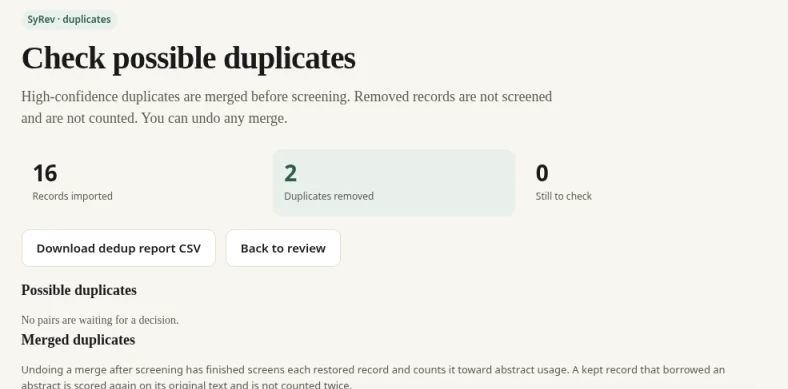
Deduplication runs automatically across all of them on every new review's import, before screening starts. Records that are clearly the same are merged for you; possible matches go to a check screen, where you decide whether to merge them or keep both.
Import and deduplication are included on every plan, including the free evaluations. For living reviews, Monitor removes exact matches (by id, PMID, PMCID, DOI or title) against the baseline and earlier periods.
STEP 3
Once your records are imported, SyRev scores every title and abstract against your criteria. In Careful mode, the default, it auto-excludes only records it judges very unlikely to meet them; the uncertain middle and likely includes stay with your reviewers.
On public benchmark reviews, SyRev reaches 96.5% recall at Careful. See full results
Individual reviews can come in lower. In our testing, the lowest per-review results often traced back to how the criteria were worded rather than to the abstracts themselves. That's why every run comes with a validation pack.
These work the same way in title/abstract and full-text screening.
STEP 4
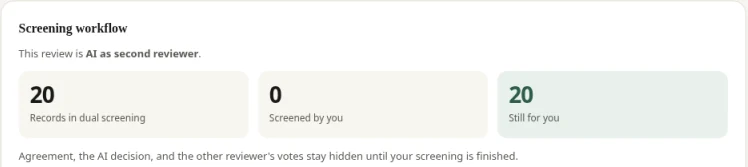
When your protocol calls for two independent reviewers, SyRev supports dual review in two modes: AI as the second reviewer, or two human reviewers. Screening stays blinded until both have screened, and disagreements go to a resolve step.
If you are a Master’s or PhD student without a second reviewer, AI as second reviewer is included on every plan. After two free title/abstract evaluations, academic Replay is $149 per review, self-serve.
Dual review applies to review projects; Monitor updates are screened in a single-reviewer workflow.
STEP 5
You don't have to take the pooled benchmark figure on trust. SyRev draws a blind random sample of the records it auto-excluded for your team to screen, and reports the result with a Wilson confidence interval, so you can see whether this review behaved like the benchmarks.
STEP 6
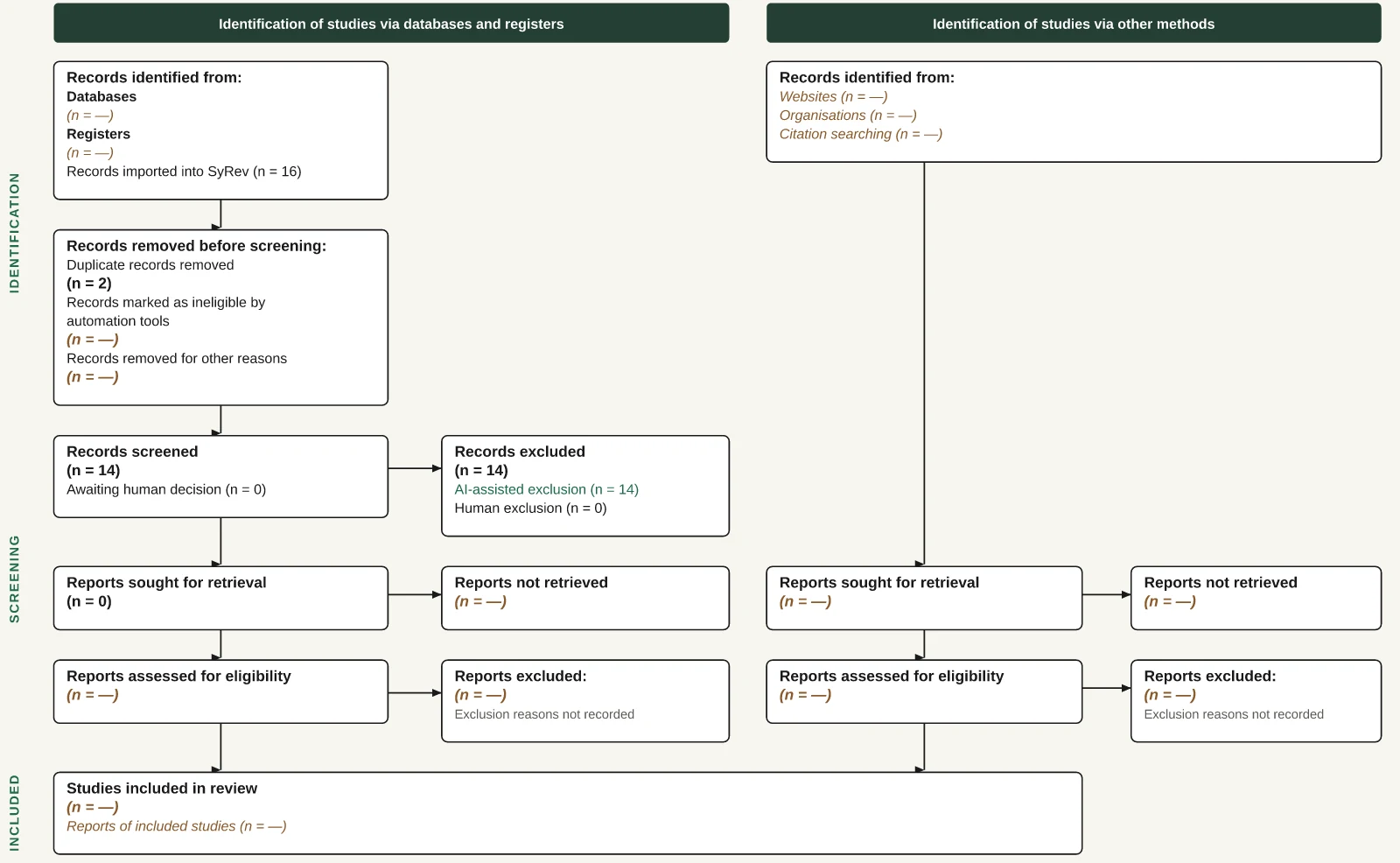
SyRev builds a PRISMA 2020 flow diagram from the decisions already made in your review. Records excluded by the AI and records excluded by people are shown in separate boxes, so readers and peer reviewers can see exactly what the automation did. Duplicates removed at import are counted in the diagram too, and with full-text screening it also shows reports not retrieved and full-text exclusions, with reasons and counts.
Export the diagram as SVG, PNG or PDF.
Every imported file is logged automatically, and SyRev detects the database and platform when the file names them (for example, MEDLINE(R) ALL on Ovid). Review owners record the date, the exact search string and the number of records found for each search, and can add searches by hand. The log fills the Databases box in your PRISMA diagram and your methods text.
STEP 7 New
After title/abstract screening, included records move to full-text review. Reviewers vote with the PDF open, alone or in dual review, and every exclusion needs a structured reason from a list your review team can edit. Conflicts and resolution work the same way as at title/abstract.
On SyRev Plus, the uncertain middle and candidate includes also get an AI full-text pass, with AI as the second reviewer or as a suggestion. When your records have a DOI, PMID or PMCID, SyRev fetches open-access PDFs automatically via Unpaywall and Europe PMC.
You upload the rest, individually or as a zip. SyRev matches them to records by DOI, PMID, filename or fuzzy title, and a "Check these PDFs" screen lets you confirm any match it isn't sure of.
STEP 8 New
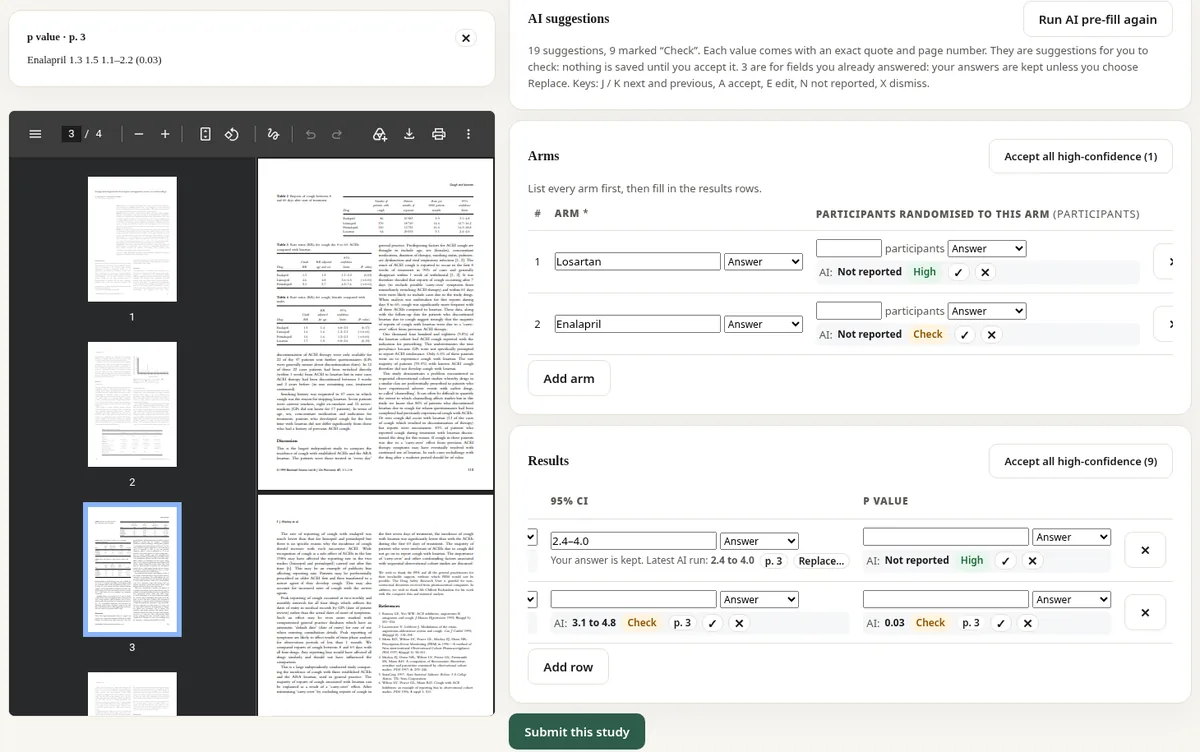
Data extraction is newly launched in SyRev. Manual extraction is free on every plan, including the free evaluations. With SyRev Plus, AI pre-fill and an AI second extractor cover up to 500 studies per review, and every suggested answer carries an exact quote and page number for the reviewer to check before accepting it.
It’s new, and we’d value your feedback: tell us what works and what you’d like to see.
STEP 9 New
Risk of bias and quality appraisal, free on every plan. Use RoB 1 (Higgins et al., BMJ 2011), AMSTAR 2, SYRCLE's risk of bias tool for animal studies, and the six NHLBI study quality assessment tools. SyRev is not affiliated with or endorsed by the National Heart, Lung, and Blood Institute (NHLBI) or the National Institutes of Health (NIH). Work with one assessor, or on Team and Institution plans with two independent assessors and a resolver. Export traffic-light and summary plots (SVG, PNG, PDF), CSV and Excel tables, a methods paragraph that names the tool and version, and a full change history.
Six NHLBI quality assessment tools, free on all plans, filled in manually by reviewers (no AI suggestions). Version shown: July 2021.
In the app: the full checklist with NHLBI's own answers (Yes / No / CD / NR / NA), the reviewer's overall rating (Good / Fair / Poor), CSV/Excel export, and traffic-light and summary figures. Work with one assessor, or on Team and Institution plans with two independent assessors and a resolver.
Source: National Heart, Lung, and Blood Institute; National Institutes of Health; U.S. Department of Health and Human Services. NHLBI Study Quality Assessment Tools and guidance (nhlbi.nih.gov)
ON EVERY PLAN
When records are imported into a new review or a Monitor update, SyRev checks them for retractions. It looks up each record's DOI in Crossref, which includes the Retraction Watch database, and its PMID in PubMed, and flags retracted studies and expressions of concern on the record while you screen.
Add your library's OpenURL link resolver, or its LibKey library ID, and each record in the screening queue gets a "Find at my library" link built from its DOI, PMID and title. The link opens your library's own service, so your usual library sign-in applies.
Anyone can set a personal library link. On Team and institutional plans, workspace owners and admins can set one for the whole workspace, and a personal setting takes priority, which helps when collaborators are at different universities.
TEAM AND INSTITUTIONAL PLANS
Team and institutional workspaces have owner and admin roles for managing people and reviews across a group.
ACCOUNTS AND WORKSPACES
SyRev protects sign-in with optional two-step verification and automatic sign-out, and gives workspace owners and admins an audit log of account and workspace activity.
To see which services process data for us, read our subprocessors list.
RIS (for example, exports from Scopus, Web of Science, Embase or Ovid), PubMed .nbib (MEDLINE format), EndNote XML and CSV. Large searches are fine: upload up to 10 files at once (25 MB each, 50 MB per upload), such as one export per database, and split very large exports across files. Duplicate detection runs automatically across all of them before screening. Import and deduplication are included on every plan, including the free evaluations.
Yes. RIS export has two options: included records, or all records with their decisions. Both respect dual-review blinding. Every review also has a decision-log CSV covering every record and decision.
Yes. You can search PubMed, OpenAlex and Europe PMC from inside SyRev and import the results into a new review, on every plan. Each search string, database, date and record count is recorded for your methods text and PRISMA reporting. You can still upload exports from other databases in the same review, and every imported file is logged in the PRISMA-S search log, with a CSV export.
Yes. Human full-text screening is free on every plan, including the free evaluations: reviewers vote with the PDF open, single or dual, and every exclusion gets a structured reason that feeds your PRISMA 2020 diagram. AI full-text screening is on Plus, as the second reviewer or as a suggestion.
Same plans as the pricing page. New accounts get 2 free title/abstract evaluations. Replay, Plus, Team and Department are self-serve. No sales call required. University and Large are arranged by email. Academic prices shown; commercial pricing.
Free
2 free title/abstract evaluations
$149 / review
Proof report + audit export
$249 / review
Everything in Replay + AI full-text pass
$29 / seat / mo
~$348 / seat / year · fair use
$2,500 / yr
One department, school or centre within one institution.
Up to 10 named users · self-serve card checkout
$9,000 / yr
One legal institution, covering all its campuses and its own email domains.
Up to 150 named users · annual invoice or purchase order
From $15,000 / yr
More than 150 users, or more than one legal entity (for example a university plus its affiliated hospital, a health system, or a consortium).
Quoted individually · Contact us
A side-by-side look at SyRev, Rayyan, Covidence and DistillerSR, and what's new at SyRev.